Terbium: A Textured Display Font with Real Character
Typography choices often come down to a quiet struggle between legibility and personality. You want something that reads well but also says something about the message itself. That balancing act gets even trickier when you need a display font—something made for headlines, logos, or short bursts of text where every letter carries weight. Enter Terbium, a textured display font from Seemly Fonts that brings a tactile, almost tangible quality to digital and print design. It isn't just another pretty face in the type world; it is a tool built for moments when you need your words to feel as much as they say.
This article walks through what makes Terbium worth your attention, where it shines, and how to put it to work without forcing it into places it doesn't belong. Whether you are a seasoned designer, a business owner trying to refresh your brand, or a hobbyist exploring new creative tools, there is something here for you.
What Exactly Is Terbium?
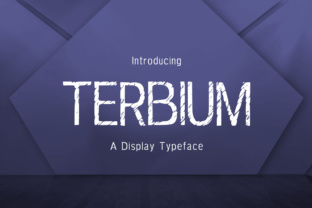
Terbium is a display typeface, which means it is designed for use at larger sizes—think headlines, pull quotes, posters, and branding elements. But what sets it apart from the thousands of other display fonts out there is the deliberate, consistent texture embedded into each glyph. This isn't a smooth, sterile vector font. It carries surface detail that mimics the look of something printed, stamped, or even carved. The texture gives it a worn-in, approachable feel without sacrificing clarity.
Seemly Fonts built Terbium with a focus on character and versatility. The weight sits in a sweet spot—bold enough to command attention but not so heavy that it feels aggressive or cartoonish. The letterforms themselves are thoughtfully drawn, with enough variation in stroke width to keep the eye moving naturally. When you look at a headline set in Terbium, you notice the texture first, but the underlying structure is what makes it work.
It is worth noting that Terbium is not a text font. You wouldn't set a 500-word blog post body copy in it, and you shouldn't try. Its strength lies in brevity and impact. The more space each letter has to breathe, the more the texture and form can do their job.
Key Characteristics That Matter
Let's get specific about what you are working with when you choose Terbium.
Texture That Feels Physical
The most obvious feature is the surface grain. It is consistent across uppercase and lowercase letters, numbers, and punctuation. This gives the font a cohesive, almost organic feel. In a world where most digital typography looks too clean, Terbium introduces a welcome roughness that catches the eye. The texture is not random noise; it follows the contours of each letter, which makes it look intentional rather than like a filter was slapped on after the fact.
Readable at Display Sizes
Some textured fonts sacrifice legibility for style. Terbium avoids that trap. The letterforms are open enough to remain readable even at medium sizes, and the texture never obscures the shape of the characters. You can use it for a hero headline at 72 points or a subheading at 36 points without squinting or guessing what a letter is supposed to be.
Strong Visual Presence
This font has presence. It doesn't whisper. When you place Terbium on a page, it becomes a focal point. That makes it ideal for situations where you need to grab attention quickly—posters, book covers, social media graphics, landing page headers, and product packaging. It pairs well with simple, clean sans-serif fonts for body copy because the contrast between textured display and smooth text creates a natural hierarchy.
Consistent Character Set
Seemly Fonts includes a solid range of glyphs, including accented characters for multilingual use. This might not matter for every project, but if you work with multiple languages or need to typeset names and places correctly, having a complete set saves you from awkward substitutions. The texture carries through across the entire character set, so nothing feels out of place.
Where Terbium Works Best
Display fonts are specialized tools, and Terbium is no exception. Knowing where to deploy it makes the difference between a design that looks intentional and one that feels mismatched.
Branding and Identity
If you are building a brand that wants to communicate craftsmanship, authenticity, or a slightly rugged edge, Terbium fits naturally. Coffee shops, breweries, artisan goods, independent bookstores, and creative agencies can all benefit from its tactile quality. It works especially well on logos, signage, and business cards where the texture adds a layer of depth that feels almost like a watermark.
One observation: Terbium pairs beautifully with natural materials. If you are designing for a brand that uses kraft paper, wood, or stone in its packaging, this font echoes that materiality. It feels grounded in a way that many modern sans-serif fonts do not.
Editorial and Publishing
Magazine covers, book titles, and section headers in print or digital publications benefit from Terbium's texture. It creates a visual anchor that separates content sections without needing extra graphic elements. A single word set in Terbium at a large size can serve as both a headline and a design element, saving you from adding decorative flourishes that might clutter the layout.
For blogs and online publications, Terbium works well for hero images and top-level headings. Just be careful with line spacing—because the texture adds visual weight, tight leading can make large text feel cramped. Give your headlines room to breathe.
Marketing and Advertising
Social media graphics, email headers, and landing page titles all need to stop the scroll. Terbium does exactly that. Its texture stands out against clean backgrounds and pairs well with photographic imagery, especially shots that feature natural textures like wood grain, concrete, or fabric. The contrast between the tactile type and a smooth digital interface creates a moment of visual interest that can improve click-through rates and engagement.
Consider using Terbium for limited-time offers, event announcements, or product drop headlines. Its bold character conveys urgency and importance without resorting to all-caps or excessive punctuation.
Posters and Large Format
This is where Terbium truly shines. At large sizes—48 points and above—the texture becomes a feature rather than a detail. Concert posters, event flyers, wall art, and presentation title slides all benefit from the font's physical feel. It reads well from a distance, which is critical for posters that need to communicate at a glance.
A recommendation: if you are printing large format, test Terbium at the actual output size before committing. Some textures that look great on screen can feel different in print, and you want to make sure the grain reads the way you intend.
Video and Motion Graphics
Yes, Terbium can work in motion, but with a caveat. Because the texture is a core feature, you want to avoid heavy animation that blurs or distorts it. Simple fades, cuts, and gentle scaling work best. Use it for title cards, lower thirds, and key quotes in video content where you want a tactile, handmade feel. The texture adds warmth to digital video, which can otherwise feel sterile.
Practical Considerations When Using Terbium
Choosing a display font is about more than aesthetics. Here are a few things to keep in mind as you evaluate whether Terbium fits your project.
Pairing with Other Fonts
Terbium is a statement font, so it needs a partner that stays out of the way. A clean, neutral sans-serif like Open Sans, Lato, or Montserrat works well for body copy. If you want a bit more contrast, try a lightweight serif for paragraph text. The key is to let Terbium do the heavy lifting visually while the supporting font handles readability. Avoid pairing it with another textured or decorative font—that quickly becomes a mess.
Color and Background Considerations
The texture in Terbium is most visible against solid, light backgrounds. White or cream backgrounds let the grain show clearly. Dark backgrounds can work, but you may lose some of the subtle surface detail. If you are using a dark background, consider increasing the font weight slightly or using a lighter tint for the type to maintain contrast. Busy photographic backgrounds can overwhelm the texture, so use careful placement or add a subtle overlay behind the text.
Licensing and Usage Rights
As with any commercial font, check the licensing terms from Seemly Fonts before committing. Some fonts cover only desktop use, while others include web and app embedding. If you are using Terbium in a client project or commercial product, make sure your license covers the specific use case. This is a practical step that saves headaches later.
Testing Before Committing
Always test Terbium in your actual design context before finalizing. Download the trial version or use the preview tool on the Seemly Fonts website. Set a few headlines, try different sizes, and look at the texture on both screen and print. What looks great in isolation might feel too heavy in a layout with multiple elements. Testing protects you from surprise mismatches.
Final Thoughts on Terbium
Terbium is not a font for every job, and it is not trying to be. It is a specialized tool for designers, creators, and communicators who need their words to carry weight, texture, and personality. In a landscape where digital typography often feels flat, Terbium brings a welcome sense of physicality that can elevate a project from ordinary to memorable.
If you are working on a brand that values authenticity, a publication that needs visual anchors, or a marketing campaign that demands attention, Terbium deserves a spot in your toolkit. Use it intentionally, pair it wisely, and let its texture do what it does best—make people stop and look.