Pixelar Family: A Practical Look at the Pixel Display Typeface from Graviton Font Foundry
When a typeface is deliberately built around pixels, it invites a specific kind of scrutiny. Pixelar Family, designed by Pablo Balcells for Graviton Font Foundry in 2012, is a pixel display typeface that does not pretend to be anything other than what it is: a crisp, grid-based set of letterforms meant for screen-native environments. Over a decade after its release, it remains relevant in contexts where retro aesthetics, legibility at small sizes, and a clean digital presence matter. This article examines what Pixelar Family offers, where it excels, where it falls short, and who stands to benefit most from using it.
What Pixelar Family Is and Why It Deserves Attention
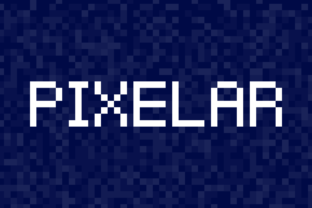
Pixelar Family is a pixel display typeface consisting of four styles. Unlike many display fonts that aim to mimic analog tools like brushes or chisels, Pixelar leans fully into its digital origin. Each character is constructed on a visible pixel grid, giving it a blocky, deliberately low-resolution appearance. The four styles provide enough variety to handle different tonal requirements without abandoning the core pixel logic.
The typeface was created at a time when flat design and responsive interfaces were gaining momentum, and pixel fonts were making a quiet comeback after years of being associated solely with early computer screens. Balcells, working under the Graviton Font Foundry label, approached the family with a sense of restraint. The letters are not overly ornamented. They follow geometric logic, and the spacing is tight enough to feel cohesive without sacrificing readability.
What makes Pixelar Family worth discussing today is its staying power. While many display typefaces from the early 2010s have aged poorly, Pixelar still works because it never tried to chase trends. It was built for a specific visual language, and that language has not gone away. Game interfaces, app prototypes, coding environments, and retro-styled branding still rely on exactly this kind of typography.
Grid-Based Construction and Visual Consistency
Every glyph in Pixelar Family is aligned to a consistent pixel grid. This means that when you set text at the intended size, each character occupies a predictable amount of horizontal and vertical space. The result is a rhythm that feels mechanical in a good way. There is no unexpected kerning, no overlapping curves, no ink traps designed for print. The typeface is built for screens, and it looks best when viewed on a display where each pixel maps cleanly to the screen's own grid.
This consistency makes Pixelar useful for UI elements that require monospaced or near-monospaced arrangements. While it is not a true monospace font, the regularity of its construction means that aligning text in tables, menus, or terminal-like interfaces is straightforward.
Four Styles for Contextual Flexibility
The four styles within the family allow for hierarchy and emphasis without switching to a different typeface. You get a regular weight, a bold weight, and likely additional variants that adjust thickness or proportions. This is a practical advantage when you need headings to stand out without breaking the pixelated aesthetic. The bold style, in particular, maintains the same grid logic but adds enough weight to function well in larger display settings such as banners, logos, or game titles.
Having multiple styles within a pixel font is less common than one might expect. Many pixel typefaces offer only a single style, which forces designers to rely on size changes alone for hierarchy. Pixelar avoids that limitation, giving you more control over typographic structure.
Designed for Screen-Native Environments
Pixelar was never intended for print. Its purpose is to render cleanly on screens where pixel alignment is critical. This is not a limitation so much as a design constraint that defines its best use cases. When you use Pixelar on a standard resolution display at the recommended size, it appears sharp and intentional. When scaled too small or too large without proper grid alignment, the effect degrades quickly. Understanding this constraint is essential to using the typeface well.
Legibility at Small Sizes
One of the strongest arguments for Pixelar Family is its legibility at small point sizes. Because each character is built from whole pixels, there are no thin strokes that might vanish or blur on low-resolution screens. This makes the typeface suitable for secondary information in games, UI labels, tooltips, and even some data visualization contexts where space is limited.
That said, legibility is not the same as readability for extended text. Pixelar is not designed for long paragraphs. If you need to display more than a few lines of body copy, this typeface will fatigue the reader. The pixel structure, while clear, is inherently more taxing to process than a well-tuned sans serif. Recognizing this boundary is important for anyone considering the family for a project.
Retro Aesthetic Without Nostalgia Overload
Many pixel fonts lean heavily into nostalgia, referencing specific 8-bit or 16-bit eras. Pixelar Family is more restrained. It evokes a digital feel without directly copying the typography of old consoles or operating systems. This makes it more versatile for modern projects that want a clean, technical look rather than a purely retro one. A fintech dashboard, a developer tool interface, or a minimalist brand identity could all use Pixelar without feeling dated.
This balance is difficult to achieve. Most pixel fonts either feel too generic or too tied to a specific historical moment. Pixelar sits in a middle ground that gives designers more room to work.
Performance in Digital Prototyping and App Design
For UX designers and front-end developers, Pixelar offers a reliable option for low-fidelity prototypes where the goal is to communicate structure rather than final polish. Its grid alignment makes it easy to integrate into wireframes and mockups without worrying about font rendering inconsistencies across browsers. When used at the correct size, it renders predictably on both macOS and Windows, which is not always the case for more complex display fonts.
In actual app design, Pixelar works well for small decorative elements, status indicators, and header labels. It is less suited for primary navigation or content-heavy screens, but as a secondary accent typeface, it holds its own.
Game Developers and Indie Studios
Game developers remain the most obvious audience for Pixelar. The typeface fits naturally into pixel-art games, retro-style interfaces, and titles that want a cohesive digital look. Indie studios working with limited budgets will appreciate that the family includes multiple styles, reducing the need to license additional fonts for different UI contexts.
For in-game menus, dialogue boxes, score displays, and button labels, Pixelar performs reliably. Developers working in engines like Unity or Godot will find that the font aligns well with screen-space rendering and does not introduce rendering quirks at typical game resolutions.
UI Designers Building Technical or Developer-Facing Tools
There is a growing category of applications aimed at developers, system administrators, and power users. These tools often embrace a minimalist, technical aesthetic. Pixelar Family can reinforce that identity without resorting to clichés. A terminal emulator, a code snippet viewer, or a metrics dashboard can all benefit from the clean, grid-aligned characters that Pixelar provides.
Designers working on these products should test Pixelar at various sizes to confirm that it renders cleanly on the target displays. It works best on screens with pixel densities where integer scaling is possible.
Marketers and Creators Targeting Tech-Savvy Audiences
Branding materials, landing pages, and social media graphics for tech products sometimes benefit from a typeface that signals a digital-first approach. Pixelar can be used sparingly in headlines or badges to reinforce a product's technical nature. Marketers should avoid using it for body copy or long-form content, but as an accent typeface in combination with a neutral sans serif, it adds character without sacrificing professionalism.
Educators and Publishers of Digital-First Content
Course platforms, coding tutorials, and digital publications that focus on technology or game design may find Pixelar useful for headings, code examples, and interactive elements. Its pixel structure aligns well with screenshots of code editors or terminal windows, creating visual consistency across the learning material.
Build Quality and Font Engineering
Graviton Font Foundry has maintained a reputation for well-engineered fonts, and Pixelar Family reflects that. The glyph set covers the essential characters needed for most Western-language projects. Kerning pairs are handled appropriately for the pixel format, and the spacing feels intentional rather than accidental. The typeface installs easily on both desktop and web platforms, and the web font version performs well in terms of file size and rendering speed.
One minor limitation is the absence of extended language support. If your project requires accented characters beyond common Western European languages, you may need to verify coverage before committing to Pixelar for a multilingual interface.
Flexibility and Integration Ease
Integrating Pixelar into an existing design system is straightforward, provided you respect its size constraints. It works best at sizes between 12 and 24 pixels for screen display, with larger sizes reserved for headings or decorative text. Web developers will appreciate that the font can be loaded via standard CSS @font-face rules and that it behaves predictably across major browsers.
The family's four styles give you enough room to build a basic typographic hierarchy without needing a second typeface. For small projects, this can simplify the design process and reduce the number of external resources you need to manage.
Long-Term Relevance
Typefaces that rely on a specific visual gimmick often fade from use within a few years. Pixelar Family has already lasted over a decade, and its relevance remains intact because the pixel aesthetic is tied to fundamental aspects of digital display technology, not to a passing trend. As long as screens continue to use grids of pixels, typefaces designed with that grid in mind will have a place.
That said, the family is not future-proof in the sense of adapting to variable font technology or extreme scaling. It is a fixed design intended for specific sizes and contexts. Users who need a more versatile pixel font that scales across a wider range of sizes may need to look elsewhere or supplement Pixelar with additional typefaces.
Practical Recommendations for Using Pixelar Family
If you are considering Pixelar for a project, here are a few considerations that will help you get the most out of it:
- Test at actual pixel sizes. Preview the font at the exact size you intend to use, preferably on the same display type your audience will use. What looks good in a mockup at 300% zoom may not hold up at actual size.
- Pair it with a clean sans serif. Pixelar works best as a display or accent typeface. Combine it with a neutral sans serif like Inter, Work Sans, or Source Sans for body copy and longer text passages.
- Avoid extreme scaling. Pixelar loses its coherence when scaled to very large or very small sizes that do not align with the pixel grid. Stay within the recommended range for your output medium.
- Use color sparingly. Because the typeface is already visually dense, adding strong colors can overwhelm the design. Neutral or low-saturation colors tend to let the pixel structure speak clearly.
- Consider the context. Pixelar suits projects that embrace digital, technical, or minimalist aesthetics. If your brand identity leans warm, organic, or traditional, this typeface may feel out of place.
Who May Want to Look Elsewhere
Pixelar Family is not for everyone. If your work involves long-form reading, print publishing, or brand identities that require a humanist or calligraphic feel, this typeface will not serve you well. It also may not be the best choice for audiences that are unfamiliar with or uninterested in digital aesthetics. A pixel font can be perceived as informal or niche, which may not align with certain professional or corporate environments.
Additionally, if you need a typeface that works across a wide range of sizes without quality loss, a vector-based sans serif or a well-tuned geometric typeface will offer more flexibility. Pixelar is a specialist tool, and its value lies in how well it performs within its intended niche.
Final Observations on Pixelar Family
Pixelar Family by Pablo Balcells and Graviton Font Foundry is a focused, well-executed pixel display typeface that has earned its place in the toolkit of designers and developers working with digital-first content. Its four styles provide enough versatility for small to medium projects, and its grid-based construction ensures consistent rendering on screen. The typeface is not a Swiss Army knife, but it was never intended to be. For those who need a clean, readable, and aesthetically coherent pixel font for interfaces, games, branding, or technical content, Pixelar remains a reliable choice more than a decade after its release.
Before committing to a license, test it in your actual environment. See how it reads at the sizes you need. If it clicks, it will serve you well. If it does not, you will know quickly, and that clarity alone is valuable when evaluating any typeface for real-world use.