Getting McLetters Right: Common Pitfalls and Practical Fixes for This Distinctive Font
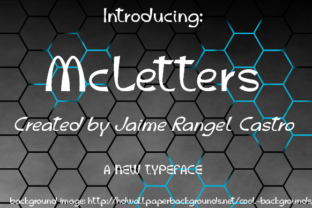
McLetters is a decorative display typeface designed by Jaime Rangel Castro that combines vintage lettering charm with playful, hand-drawn character. Its bold, slightly irregular forms and nostalgic feel have made it popular for posters, branding, social media graphics, merchandise, and any project where personality matters more than rigid uniformity. But like any distinctive font, using McLetters well requires understanding what it is—and what it is not.
Many people are drawn to McLetters for its expressive, almost tactile quality. It looks like something painted on a worn wooden sign or hand-lettered on a café chalkboard. That warmth is exactly why it works so well in certain contexts. However, that same distinctiveness can backfire when used carelessly. Let's walk through some of the most common mistakes people make with McLetters, and more importantly, how to avoid them.
Mistake One: Treating McLetters Like a Workhorse Text Font
The most frequent error I see is people using McLetters for body text. It looks so friendly and approachable that it is tempting to use it everywhere—paragraphs, long descriptions, even entire web pages. But McLetters is a display font, designed for headlines, short phrases, and attention-grabbing elements. Its irregular strokes and variable letter widths make extended reading uncomfortable. Readers will tire quickly, and your message gets lost in the visual noise.
What to do instead: Reserve McLetters for short, impactful text. Pair it with a clean, neutral sans-serif or serif font for longer content. For example, use McLetters for your main heading or a pull quote, and let a simple font like Open Sans or Lora handle the paragraphs. This contrast gives your design hierarchy and lets McLetters shine without overwhelming.
Mistake Two: Ignoring Spacing and Kerning Adjustments
McLetters has a deliberately uneven, hand-drawn quality. That means letter spacing—both between individual characters and between words—often needs manual adjustment. If you load McLetters and type away without tweaking kerning, you can end up with awkward gaps or crowded clusters that look sloppy rather than charming.
This is especially noticeable in all-caps settings or when using McLetters for logos and short titles. The font's irregular shapes need room to breathe.
Practical fix: After placing your text, zoom in and examine the spacing between each pair of letters. In most design software (Illustrator, InDesign, Photoshop, or even Canva), you can adjust kerning manually. Increase tracking slightly for headings to give the letters more air. For logos, consider manually positioning each letter for optimal balance. A little effort here separates a professional result from a haphazard one.
Mistake Three: Overlooking Legibility at Small Sizes
McLetters is bold and expressive, but its fine details—like thin strokes, angled serifs, and uneven baselines—can become muddy or disappear when scaled down. Many people download McLetters, use it for a small subheading or a product label, and wonder why it looks blurry or hard to read.
Why this happens: Display fonts are designed for large sizes where their character can be appreciated. At small sizes, those same features work against readability. The font's slight irregularity, which looks artistic at 72 points, can look like a printing error at 14 points.
Better approach: If you need text smaller than about 24 points, avoid McLetters. Use it for headers, banners, or prominent callouts. For smaller elements like captions, footnotes, or fine print, switch to a simpler font. Test your design at actual output size—print it or view it on a phone screen—before finalizing. If you cannot read it comfortably at that size, it is too small for McLetters.
Mistake Four: Assuming McLetters Works for Every Brand or Audience
Not all brands benefit from the rustic, hand-drawn look of McLetters. A financial services website, a medical practice, or a corporate law firm would likely send the wrong message with this font. Its personality is strong, and it carries connotations of artisanal, retro, creative, and informal. If your brand voice is serious, modern, or minimalist, McLetters will clash.
How to evaluate fit: Before committing, ask yourself what emotional tone you want to convey. McLetters feels warm, approachable, and slightly imperfect. If that aligns with your brand—say, for a craft brewery, a children's bookstore, a bakery, or a creative agency—it can be a great choice. If you need to communicate precision, authority, or professionalism, look elsewhere.
Also consider your audience. Younger, design-savvy audiences may appreciate the vintage aesthetic. Older or more conservative audiences might read it as unpolished. There is no single right answer, but thinking about audience expectations helps you avoid a mismatch.
Mistake Five: Forgetting About Licensing and Usage Rights
This is one of the most overlooked details. McLetters, like many fonts by independent designers, comes with specific licensing terms. Some versions are free for personal use but require a license for commercial projects. Others have restrictions on embedding in digital products, using in logos, or selling merchandise.
Real consequences: Using a font without proper licensing can lead to legal notices, removal of your work from platforms, or financial penalties. It also undermines the designer's work. Jaime Rangel Castro put significant effort into creating McLetters, and respecting the license is both ethical and practical.
What to check: Always read the license agreement before downloading. If you plan to use McLetters for a business, a client project, or any revenue-generating activity, confirm that your license covers that use. When in doubt, purchase a commercial license from a reputable foundry or marketplace. Keep a record of your license in case questions arise later.
Mistake Six: Choosing the Wrong File Format
McLetters is available in multiple formats—OTF, TTF, WOFF, and sometimes others. Each serves a different purpose. Using the wrong format can cause installation issues, missing characters, or poor performance on web or print.
Quick guide:
- OTF (OpenType) is generally the best choice for print and desktop design. It supports more advanced typographic features.
- TTF (TrueType) works well for most applications and is widely compatible.
- WOFF and WOFF2 are for web use. They are compressed for faster loading and include licensing metadata.
Common mistake: Downloading a web font and trying to install it on your computer, or vice versa. Always select the format that matches your intended use. If you are designing for both print and web, download both desktop and web versions.
Mistake Seven: Using McLetters Without Considering Contrast and Background
Because McLetters has a relatively heavy weight and irregular edges, it needs enough contrast against its background to be readable. Light gray text on a white background, or dark brown on black, will disappear. Similarly, placing McLetters over a busy photographic background can make it unreadable.
Better practice: Use McLetters on solid, simple backgrounds. White, cream, black, or muted colors work well. If you must place it over an image, add a semi-transparent overlay or a solid text box behind the text. Increase the font weight or size to compensate for lower contrast. Test readability at different distances and screen sizes.
Mistake Eight: Not Testing on Real Devices and Print
Designing on a high-resolution monitor can give a false sense of how McLetters will look in the real world. What appears crisp and balanced on your screen may look different when printed on uncoated paper or viewed on a mobile device.
Practical advice: Always test your design in the final medium. Print a sample at actual size and check readability from a natural distance. For digital projects, view the design on a phone, tablet, and laptop. If the font looks too heavy, too light, or too uneven, adjust your sizing, spacing, or color choices accordingly.
Putting It All Together: A Smarter Way to Use McLetters
McLetters is a wonderful font when used with intention. Its charm lies in its imperfection, but that same quality demands thoughtful handling. By keeping these common mistakes in mind, you can avoid the pitfalls that lead to messy, hard-to-read, or off-brand designs.
Start by asking yourself: Is McLetters right for this specific project? If yes, use it sparingly, pair it with a neutral companion font, adjust spacing manually, and respect the licensing. Test your design at actual size and in the final medium. When you treat McLetters as a special tool rather than a default option, it rewards you with personality, warmth, and a distinctive visual voice.
The designers and creators who get the best results from McLetters are not the ones who use it everywhere—they are the ones who use it precisely where it matters most.