The Art and Utility of Alisandra: A Handwritten Script Font with Elegant Alternates
Understanding the Design Philosophy Behind Alisandra
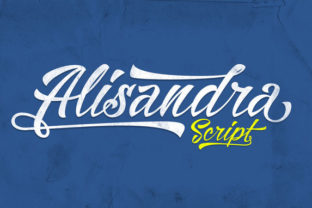
Typography in the digital age has moved far beyond simple letterforms. Among the growing library of script fonts, Alisandra stands out as a beautifully crafted handwritten script that captures the fluidity of natural penmanship while offering advanced typographic control. The font's smooth, elegant strokes evoke the feel of a skilled calligrapher's hand, yet every character has been carefully digitized to maintain consistency across platforms. What makes Alisandra particularly compelling is not just its aesthetic appeal but the depth of its technical features, which include Stylistic Alternates, Contextual Alternates, Ligatures, Stylistic Set 01, and comprehensive Kerning. These elements work together to give users the ability to create text that feels spontaneous and organic, rather than mechanically repetitive.
For designers and content creators, the choice of a script font often involves a trade-off between beauty and readability. Many ornate scripts sacrifice legibility for flair, while simpler fonts lack personality. Alisandra navigates this balance with deliberate care. Its letterforms are smooth and flowing, with generous spacing that prevents crowding even at smaller sizes. The alternate swashes and bonus characters add decorative flourishes without overwhelming the primary text. This makes Alisandra suitable for everything from wedding invitations to brand logos, where the goal is to convey elegance without sacrificing clarity.
Key Typographic Features That Define Alisandra's Character
The technical specifications of Alisandra reveal a font designed with both the casual user and the professional typographer in mind. Each feature serves a distinct purpose in enhancing the final output.
- Stylistic Alternates allow users to replace default letterforms with more ornate or simplified versions. For example, the lowercase "g" or "y" can shift from a simple loop to a sweeping tail, depending on the desired tone. This is particularly useful for branding where a consistent yet varied look is required.
- Contextual Alternates automatically adjust letter shapes based on neighboring characters. In Alisandra, this means that certain letters will connect more naturally to adjacent letters, mimicking the flow of real handwriting. Without this feature, script fonts often look disjointed, with awkward gaps or collisions between characters.
- Ligatures combine two or more characters into a single glyph. Common pairs like "th", "fi", or "fl" become graceful, connected forms that improve both readability and visual harmony. Alisandra includes a robust set of ligatures that cover most standard English combinations.
- Stylistic Set 01 offers an additional layer of variation. When enabled, this set replaces certain default glyphs with more expressive versions, such as alternate capital letters or extended descenders. It is ideal for headlines or short phrases where maximum impact is desired.
- Kerning ensures that each pair of letters has appropriate spacing. Alisandra's kerning tables have been carefully tuned so that even difficult combinations like "AV" or "To" sit comfortably together without looking spaced out or cramped.
These features are not merely decorative. They serve practical purposes in real-world projects. For instance, a wedding stationery designer might use Stylistic Alternates to create a unique monogram, while a social media manager could rely on Contextual Alternates to keep Instagram quotes looking fluid and natural. Understanding when and how to enable these features is key to getting the most out of Alisandra.
Enabling Contextual Alternates in Photoshop and Other Tools
One of the most common questions among users is how to unlock the full potential of Alisandra in design software. If you are a Photoshop user, make sure to enable Contextual Alternates to see the font behave as intended. This setting tells the application to automatically select the most appropriate letterform based on surrounding characters. Without it, Alisandra will still render, but the text will lack the natural connecting strokes that make it look like genuine handwriting. The same principle applies to Adobe Illustrator, InDesign, and most professional layout tools. In applications like Microsoft Word or Canva, support for OpenType features varies, so it is worth testing Alisandra in your primary design environment before committing to a project.
For users working in web design, implementing Alisandra via @font-face requires careful CSS configuration. The font-feature-settings property must be explicitly set to enable Contextual Alternates, Ligatures, and Stylistic Sets. A typical rule might look like font-feature-settings: "calt" 1, "liga" 1, "ss01" 1. This ensures that the font renders consistently across browsers, though it is always wise to test on multiple devices. Web developers should also consider fallback fonts for older browsers that do not support advanced OpenType features, as Alisandra's charm is diminished when reduced to basic letterforms.
Practical Applications Across Different User Groups
Alisandra's versatility makes it suitable for a wide range of users, each with distinct needs and workflows.
Graphic Designers and Branding Professionals
For designers, Alisandra offers a way to inject personality into logos, packaging, and promotional materials without resorting to generic script fonts. The availability of multiple alternate characters means that a brand can maintain a consistent yet non-repetitive visual identity. For example, a boutique bakery could use Alisandra's swashes to create a custom wordmark for "Patisserie" that feels handcrafted. The bonus characters, which include decorative hearts, stars, and flourishes, add further value for creating borders or accent elements.
Event Planners and Wedding Professionals
In the events industry, typography sets the tone for invitations, place cards, signs, and thank-you notes. Alisandra's elegant smooth letters work beautifully on both digital invitations and printed stationery. The contextual alternates ensure that names and short phrases appear connected and graceful. Event planners often need to produce large volumes of personalized items, and Alisandra's consistent kerning reduces the need for manual spacing adjustments, saving time during production.
Content Creators and Social Media Managers
Social media content thrives on visual distinction. Alisandra can be used for quote graphics, story highlights, channel art, and video titles. Its readability at medium sizes makes it suitable for overlays on photos, while the alternate swashes add a decorative touch without distracting from the message. Content creators who work across multiple platforms will appreciate that Alisandra maintains its character whether rendered in a static image or a short video title.
Educators and Hobbyists
For those teaching calligraphy or typography, Alisandra serves as an excellent example of how digital fonts can emulate traditional penmanship. Hobbyists working on scrapbooking, journaling, or DIY projects will find the bonus characters and stylistic sets empowering, as they allow for creative expression without needing advanced design skills. The font's smooth lines also make it a good choice for printable worksheets or decorative classroom materials.
Business Owners and Marketers
Small business owners often need to produce professional-looking materials without hiring a designer. Alisandra can elevate everyday communications such as email headers, flyers, social media posts, and presentation slides. Its elegance conveys a sense of care and quality, which is especially valuable for service-based businesses like florists, photographers, or event coordinators. Even a simple "Thank You" card can feel premium when set in Alisandra with contextural alternates enabled.
Real-World Examples and Observations
Consider a scenario where a photographer uses Alisandra for a wedding album cover. The font's ligatures connect the couple's names in a way that feels intimate and personal. By enabling Stylistic Set 01, the initial capital letters take on a more flourished form, adding a touch of ceremony. Without these features, the same names would appear as separate, disconnected letters, losing the emotional resonance that the photographer intended.
Another example comes from a small coffee shop that uses Alisandra for its chalkboard-style menu headers. The contextual alternates ensure that the word "Espresso" flows naturally, with the "s" and "p" connecting elegantly. The shop owner reported that customers often compliment the menu's look, attributing a sense of artisanal quality to the business. This is the kind of real-world impact that a well-chosen font can have on brand perception.
From a technical standpoint, users should be aware that Alisandra's advanced features require OpenType-aware software. In programs that do not support these features, the font will still render, but it will fall back to default letterforms that lack the connecting strokes and alternates. This is not a flaw in the font itself but a limitation of the rendering environment. For critical projects, always test the final output in the medium where it will be viewed, whether that is a printed proof, a web page, or a video overlay.
Considerations for Choosing Alisandra Over Other Script Fonts
When comparing Alisandra to other handwritten script fonts, several distinctions emerge. Many script fonts offer either a large set of alternates or good kerning, but rarely both. Alisandra combines these features with a consistent aesthetic that does not lean too formal or too casual. Its stroke weight is moderate, making it legible at both small and large sizes, which is not always true for highly decorative scripts.
Another consideration is the availability of bonus characters. Alisandra includes decorative elements that would otherwise require a separate dingbat font. This integration saves time and ensures stylistic coherence. For users who frequently create decorative text blocks, monograms, or ornamental headers, these additional glyphs are a practical advantage.
On the other hand, users who need a script font for extended body text may find Alisandra better suited for short to medium-length passages. Like most script fonts, it is optimized for display purposes rather than paragraphs of dense text. For longer content, pairing Alisandra with a clean sans-serif or serif body font creates a balanced typographic hierarchy. The contrast between a flowing script header and a neutral body font is a classic and effective design strategy.
Workflow Tips for Integrating Alisandra into Your Projects
To get the best results with Alisandra, consider the following practical steps. First, install the font and test it in your primary design application. Open the Glyphs panel to browse the available alternates and swashes. Select a word or phrase and experiment with enabling different OpenType features one at a time to see how they affect the appearance. This hands-on exploration is the fastest way to understand how Alisandra behaves in your specific workflow.
Second, when using Alisandra in a logo or headline, avoid overloading the design with too many decorative elements. The font's alternates are best used sparingly to highlight key letters or to create a unique signature look. Overusing swashes can make text appear cluttered and reduce readability. A common best practice is to apply flourishes only to initial capitals or to the first and last letters of a word.
Third, for print projects, always request a proof before mass production. Colors, paper texture, and printing method can all affect how Alisandra's fine strokes appear. On rough or absorbent paper, thin hairlines may become less visible, so choosing a slightly heavier weight or adjusting the font size may be necessary. For digital projects, test the font on different screen sizes to ensure that the connecting strokes remain clear on mobile devices.
Finally, keep a record of the specific OpenType settings you use for each project. If you need to revisit a design months later, knowing exactly which stylistic set and alternates were active will save time and ensure consistency. Some design applications allow you to save these settings as part of a paragraph or character style, which is highly recommended for recurring projects.
Alisandra represents a thoughtful convergence of artistic expression and practical functionality. Its elegant handwritten letters, combined with robust typographic features, make it a valuable tool for anyone who values quality in their visual communications. By understanding its capabilities and limitations, users can deploy Alisandra with confidence, whether they are crafting a brand identity, a wedding invitation, or a social media campaign. The font rewards attention to detail, and those who take the time to explore its alternates and settings will find a versatile asset that brings warmth and sophistication to their work.