Chester Font: An Objective Evaluation for Designers
When searching for a display typeface with vintage character, you may encounter Chester. This font draws inspiration from the visual language of old postcard stamps and rustic sign painting. The result is a layered, ornamental set that allows designers to build intricate compositions. But like any specialized tool, Chester works well in some contexts and less so in others. This evaluation breaks down what Chester offers, where it excels, where alternatives might serve you better, and how to decide if it matches your project’s needs.
Understanding Chester’s Design DNA
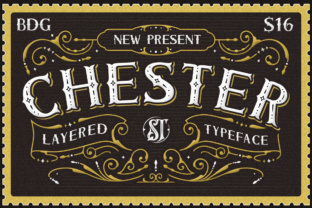
Chester is not a single font file; it is a set of layered components. The design mimics the inked, imperfect edges found on vintage postage stamps and the hand-painted lettering of old storefronts. The letters carry a worn, slightly distressed texture, with decorative flourishes that echo turn-of-the-century typography. The layering system lets you combine separate elements—such as outlines, shadows, fills, and embellishments—to produce a finished letterform.
This structural complexity is Chester’s most distinctive feature. Rather than offering a single weight or style, the typeface encourages you to build your own version of each character. For designers who enjoy constructing custom lettering, this can feel liberating. For others, the initial learning curve might be steep.
Key Characteristics
- Layered construction: Separate font files for outlines, fills, shadows, and decorative elements.
- Distressed texture: Edges and surfaces that mimic ink bleed, stamp cancellation marks, and brush irregularities.
- Ornamental flourishes: Swashes, tails, and decorative glyphs that add period-appropriate detail.
- All-caps display nature: Chester is primarily designed for headlines and short texts, not extended reading.
What Draws Designers to Chester?
People researching Chester are often seeking a font that conveys authenticity, nostalgia, and craftsmanship. The combination of stamp-like edges and sign-painter aesthetics appeals to projects where a handmade, turn-of-the-century feel is essential. Another common reason is the ability to layer: instead of using a single pre-baked letter, you can control the depth, color, and texture of each component. This allows for highly customized results in branding, packaging, and poster design.
Designers also mention the richness of detail. Each letter includes small imperfections that make digital work look printed or painted. For projects that aim to evoke a bygone era, this level of character is hard to replicate with a standard sans-serif or script font.
Evaluating Chester’s Strengths and Limitations
Any evaluation of Chester must weigh its unique aesthetic payoff against practical tradeoffs. Below is a balanced look at what the font does well and where you may encounter challenges.
Benefits
- Visual depth and texture: The layering system creates letterforms that feel dimensional and handcrafted. This can elevate packaging, logos, and event materials where a premium vintage look is desired.
- Customisation: Because you assemble letters from separate layers, you have granular control over color, shadow intensity, and which decorative elements appear. This flexibility is rare in pre-assembled display fonts.
- Distinctive personality: Chester does not look like most modern or retro fonts. Its combination of stamp and sign-painter influences stands apart from the crowded field of “vintage” typefaces.
- Cohesive system: When used as intended, the layered elements lock together seamlessly, producing a unified style that feels designed rather than haphazard.
Limitations
- Legibility at small sizes: The distressed edges and ornamental flourishes reduce readability. Chester works best at large point sizes (48px and above). Using it for body text or small captions will likely frustrate readers.
- Learning curve: Working with multiple font layers requires careful organization in your design software. You need to align layers precisely, manage color assignments, and understand how each component interacts. This is more time-consuming than applying a single font.
- File and software demands: Most layering is easiest in vector design programs like Adobe Illustrator or Affinity Designer. In page layout or web design tools, layering may be less intuitive, requiring extra steps or manual SVG construction.
- Not a one-size-fits-all solution: Chester’s strong character can clash with minimalist or modern aesthetics. It also may not suit projects that require clean, neutral typography.
When Chester Shines: Ideal Use Cases
Chester performs best in projects where its vintage, hand-crafted feel adds value. Common strong fits include:
- Packaging for artisanal or heritage products: Labels for craft beer, jam, coffee, or soap can benefit from the stamp-like textures and layered depth. The font suggests authenticity and small-batch care.
- Event posters and invitations: For weddings, festivals, or gallery openings with a nostalgic or Americana theme, Chester’s ornamentation creates the right mood.
- Branding for businesses with a rustic or vintage identity: Barbershops, diners, print shops, and antique stores often use fonts like Chester to reinforce their visual story.
- Decorative headlines in editorial design: Magazine covers or feature spreads that want a bold, textured headline benefit from Chester’s visual weight.
- Logos and wordmarks: When you need a single word or short phrase to convey period craftsmanship, Chester’s layered approach allows for a custom, non-generic mark.
When to Consider Alternatives
Chester is not the right choice in every situation. Here are scenarios where you might look at other typefaces:
- Body copy or long-form reading: Chester is strictly a display font. For paragraphs, consider a legible serif or sans-serif with vintage influences, such as Cooper Hewitt or Libre Baskerville.
- Minimalist or modern design: If your project requires clean geometry, sparse layout, or a contemporary feel, Chester’s ornamentation will feel cluttered. A simple geometric sans like Montserrat or Futura may serve better.
- Digital-only projects with strict performance constraints: Layered fonts can increase file size and complexity for web use. If you need a single lightweight font that renders well across devices, a standard web font with similar vintage tone (like Playfair Display or Abril Fatface) may be more practical.
- Projects requiring high legibility at small scale: Business cards, app buttons, or product labels with fine text will not show Chester well. A clean, slightly condensed sans-serif would be more readable.
Practical Considerations Before Choosing Chester
If you are evaluating Chester for a specific project, take the following factors into account:
Licensing and file formats
Check whether the version you purchase includes all the layers, swashes, and alternative glyphs. Some font foundries sell the base layer set separately from the decorative extras. Confirm that the license covers your intended use—commercial projects, web embedding, or print runs. Also verify that the files are compatible with your design software (OTF, TTF, or variable font formats).
Pairing with other fonts
Because Chester is so detailed, it works best when paired with a neutral, unadorned companion font. Consider a simple sans-serif for supporting text, contact details, or secondary headlines. The contrast between Chester’s ornamentation and a clean counterpart balances the overall layout. Avoid pairing Chester with another heavily decorative font—the result can feel chaotic.
Testing at different scales
Before committing, download a trial version or use the font in mockups at the actual sizes and media for your project. View it on screen and in print if possible. Check how the layering looks when reduced to the smallest intended size. Sometimes the distress marks can cause letters to become illegible at smaller point sizes, even for headlines.
Workflow integration
Plan how you will manage the layers. In design programs, you typically use a separate text layer for each component (fill, outline, shadow, decoration). You can group these layers and treat them as a single visual element, but the process takes more organization than using a single font. If you work on a team, ensure other designers are familiar with layered font workflows.
How to Decide If Chester Fits Your Project
Ultimately, choosing Chester comes down to aligning the font’s strengths with your design goals. Ask yourself the following questions:
- Does my project tell a story that benefits from a hand-crafted, early 20th-century aesthetic? If yes, Chester adds authenticity. If your brand or event is contemporary or tech-oriented, the vintage styling may feel forced.
- Will I use the font at large sizes where its details can be appreciated? For headlines, titles, and logos, Chester performs well. For small or crowded layouts, its value decreases.
- Am I comfortable with a layered workflow? If you enjoy experimenting with typography and have time to refine each letter, Chester offers creative control. If you need a quick, straightforward font, look at single-file display typefaces.
- Does the vintage feel match the intended audience? Chester evokes nostalgia, which may resonate with customers seeking tradition or craftsmanship. For audiences expecting sleek modernity, it could appear dated rather than charming.
Chester is a specialized tool. It delivers an evocative, layered aesthetic that few other fonts can match. But its complexity and strong personality mean it requires thoughtful application. For the right project—vintage branding, artisanal packaging, or decorative headlines—Chester can become a defining element. For others, a simpler alternative may achieve the desired effect with less effort. By evaluating your project’s context, audience, and practical constraints, you can make an informed choice that serves both your design and your readers.