Using the Rust Font Family to Strengthen Your Visual Workflow
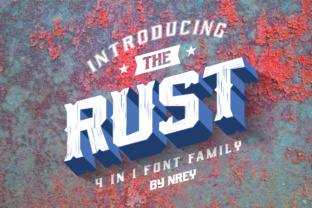
Selecting a typeface is a strategic decision that shapes how an audience perceives a brand before they internalize a single message. The Rust font family, a serif display collection available in four distinct versions—Rust, Rust Spurs, Rust Scratch, and Rust Sport—offers a deliberately strong, bold, and textured aesthetic. It is not a neutral choice, nor is it designed for body copy. Instead, it serves a specific function within a larger design system. Understanding how to integrate Rust into your preparation, execution, and long-term asset management is essential for maximizing its impact while maintaining readability and consistency across projects.
Mapping the Rust Family to Your Project Requirements
Before committing to a display font, evaluate the core emotional tone of the project. The Rust family is inherently rugged, historical, or athletic, depending on the variant you select. This makes it suitable for brands in hardware, outdoors, automotive, craft food and beverage, collegiate sports, esports, and entertainment.
Rust (Standard) carries a weathered, industrial feel. It works well for logos, signage, and large-format prints where a moderate level of distress is acceptable. Rust Spurs leans into a southwestern or Western aesthetic, making it a targeted choice for regional brands, rodeo events, or country music venues. Rust Scratch is the most aggressive variant, with visible grunge and high-energy distress. It fits underground music, streetwear, horror media, or limited-edition campaigns. Rust Sport is the most versatile of the four, offering a bold, collegiate or competitive block serif that works for team uniforms, game graphics, and fitness brands.
To integrate this into your initial planning phase, create a brand attribute matrix. List adjectives that describe the project—such as "sturdy," "traditional," "aggressive," or "authentic"—and map them to the appropriate Rust variant. This prevents the mismatch of using a distressed aesthetic for a polished corporate identity or a sporty typeface for a heritage brand.
Pre-Production Preparation and Compatibility Checks
Once you have selected the appropriate variant, the next step is ensuring technical compatibility with your existing tools and output requirements. Begin with licensing review. Desktop licensing covers static print and digital images. Web licensing is required for website embedding using CSS @font-face rules. App licensing covers mobile or desktop software. Verify that the licenses you purchase match your distribution channels.
Next, assess language support and glyph coverage. If your project requires extended Latin characters, Eastern European support, or specific punctuation, check the font’s character map before finalizing your choice. Display fonts often have limited glyph sets compared to text families, so confirming this early prevents rework later.
For team environments, set up a shared font repository. Use a syncing service like Adobe Fonts if available, or self-host the files on a central server with clear naming conventions. This ensures that every designer uses the exact same version of Rust, avoiding substitution issues during file handoffs. In web development workflows, specify font-display: swap in your CSS to ensure text remains visible while the custom font loads, preserving user experience.
Structuring Typography During the Design Phase
Using a display serif like Rust requires a clear hierarchy. Using it for all text levels creates visual noise and reduces legibility. Instead, reserve Rust for headings and accent elements. Pair it with a neutral sans-serif for body copy—options like Open Sans, Lato, or Work Sans provide a clean counterbalance to Rust’s texture.
When setting up your digital canvas in tools like Adobe InDesign, Photoshop, Figma, or Canva, define your typographic scale early. For example:
- H1 / Main Headline: Rust Sport or Rust Core, bold weight, sizes above 48pt.
- H2 / Section Headers: Rust Standard, regular weight, 30–36pt.
- Pull Quotes or Accents: Rust Scratch or Rust Spurs, used sparingly at 24–30pt.
- Body Text: Sans-serif at 14–18pt with generous line height.
Apply paragraph styles in InDesign or text styles in Figma immediately. This not only speeds up formatting but ensures consistency across multi-page documents such as brochures, zines, or presentation decks. In Photoshop or Canva, save a branded template file with these styles pre-loaded. For recurring social media assets or email headers, this reduces setup time significantly.
Pay close attention to kerning and tracking. Distressed fonts like Rust Scratch can appear fragmented if letter spacing is too tight. Headlines often benefit from slightly looser tracking to let each letterform breathe and retain its distinct rugged edges. Test your headlines at various sizes and on different backgrounds to confirm that the texture does not obscure readability.
Quality Control and Iteration Across Media
Quality control for a display font with strong texture involves checking legibility at different sizes and on different substrates. In print, test how Rust Scratch or Rust Spurs renders at smaller point sizes on uncoated paper. The fine details of the distress may fill in or become muddy. If this happens, restrict those variants to larger applications and use a cleaner companion font for secondary text.
In digital contexts, test the font across major browsers and operating systems. Windows rendering often handles fonts differently than macOS, especially with textured serifs. Use tools like Font Dropper or browser developer tools to verify that the font loads correctly and retains its intended shape. If using Rust for a logo or hero image, consider converting the text to outlines or vectors to guarantee visual consistency regardless of the viewer’s system.
A/B testing can provide useful data here. For marketing campaigns, test a control version using a clean sans-serif against a variant using Rust Sport. Measure click-through rates or engagement metrics to see if the bold aesthetic resonates with your specific audience. This is especially relevant for entrepreneurs and small business owners who want to validate their branding decisions with real user behavior.
Long-Term Asset Management and Brand Scalability
Integrating Rust into a brand system requires documentation. Create an entry in your brand style guide that specifies which variant of Rust to use for which purpose. Include minimum size thresholds, acceptable color applications, and examples of improper usage. For instance, you may specify that Rust Scratch is reserved for limited-time promotions only, while Rust Sport is used for all product packaging headers.
When scaling the brand—such as adding a new product line or expanding into a new market—revisit your typography choices. A sub-brand may require a different variant of Rust to signal a shift in tone. For example, a parent brand using Rust Standard for its primary identity might launch a youth-oriented product line under Rust Scratch. This maintains visual cohesion while allowing differentiation.
Archiving is equally important. Store original font files, license documentation, and project files with the fonts embedded or outlined. If you are a freelancer or small business owner, this practice ensures you can revisit and update assets months or years later without compatibility issues. Cloud storage with version control is a practical solution for maintaining these assets long-term.
Troubleshooting Common Implementation Issues
Several practical concerns arise when working with a display family like Rust. File format compatibility is one. If your team works across Windows and macOS, use OTF or TTF files consistently. For web, provide WOFF2 files with proper MIME types configured on your server. If a Rust variant lacks a specific weight you need, consider layering effects in your design software to simulate a heavier or lighter version, rather than distorting the font directly.
If you encounter spacing problems where the distressed edges of Rust Scratch overlap awkwardly, manually adjust kerning pairs or use the tracking controls. In some cases, adding a subtle drop shadow or outline can help separate the letterforms from a busy background without compromising the raw aesthetic.
For teams using content management systems, ensure your theme’s CSS properly queues the custom font files. Incorrect file paths or caching issues are common causes of failed font loads. Use a font loading strategy like font-display: optional for decorative elements that are non-critical, or font-display: swap for headlines that form the core visual identity.
Ultimately, the Rust font family is a tool that delivers maximum value when used with intention. By selecting the right variant for your project, preparing your technical environment, structuring your hierarchy during design, and maintaining consistency over time, you gain a distinctive visual asset that reinforces your brand’s message without sacrificing usability.